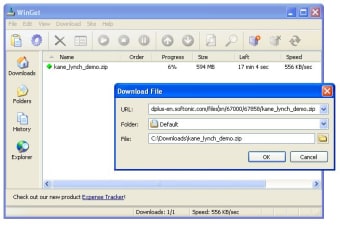
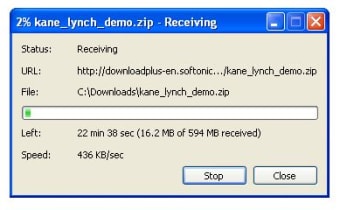
WinGet is a simple download manager that makes the task of downloading files lighter on you.
Unlock your creativity with Adobe Stock
Get 10 images or 1 video with a free trial
The program looks quite basic when compared to other similar tools, both in appearance and functionality. Although the developers have included general browser integration among its features, we couldn't make it work with Firefox – only with Internet Explorer.
However, as the program can also monitor the Clipboard, you can copy links in Firefox in order to be able to download them with WinGet. Inexplicably, sometimes the program keeps on displaying the download start dialog, which I found pretty annoying.
All your downloads are conveniently organized by the program into different customizable categories. You can also check the amount of data downloaded during a certain period of time, be it just today or the whole month. WinGet features a quite complete configuration menu where you can tweak the program's behavior from its bandwidth usage limit to what it should do after the download is finished.
WinGet is a small, lightweight download manager that includes only the most basic tools in this kind of software applications.
Pros
Organizes downloads in categories
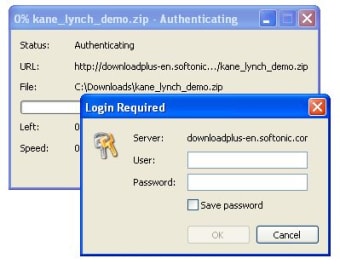
Supports password protected servers
Can be scheduled for further action after downloading
WinGet is a download manager that can increase download speeds by up to 300 percent. You may automatically resume broken downloads if your connection is lost or if your computer accidentally shuts down.WinGet is fully integrated into the browser, providing the best possible performance from any Internet connection. It has also support for proxy servers, authentication and cookies.
Multiple Protocol Support
WinGet supports file download from both file transfer (FTP) and web (HTTP) servers.
Browser Integration
WinGet works as the default download tool for Internet Explorer, Opera and Mozilla-based browsers. It can monitor clicks in the browser, also it integrates in the browser's right-click menu.
Accelerated Downloads
By splitting the files into several parts and downloading them at the same time you save time. In some cases the acceleration can be several hundreds percent.
Reliable Downloads
WinGet will make unlimited amount of attempts to download the file, until download is completed.
Superior Ease-of-Use
WinGet's interface is logical, integrated, informative and customizable. Queue your downloads with WinGet's logical queuing system.
Site Explorer
Built-in explorer allows to browse remote FTP sites in a user-friendly format, so you can choose what files you want to download.
Proxy Support
You can enable HTTP or SOCKS proxy support to access servers through the firewall.
Laws concerning the use of this software vary from country to country. We do not encourage or condone the use of this program if it is in violation of these laws. Softonic may receive a referral fee if you click or buy any of the products featured here.